01
Upload the block
Drop the .3dm: closed polysurfaces, no layers or names needed. Your file is kept untouched; everything happens on a copy.
.3dm · up to 800 MB · construction + block code Sheet 01 / 08 · The drawing office, automated
Sign in
Start free →
Upload a naked 3D block. AIADSTATION numbers, locates and documents every part and hands back the production pack: BOM, profiles, takeoff, weights, bending, nesting and sketches.
A yard model arrives as thousands of anonymous solids. AIADSTATION measures each one and writes what your production needs straight onto it: the part number, what it is, where it sits and what it weighs. Then it draws the documents from those tags.
| IDN | 214 |
| type | .10 |
| T | FLAT |
| mat | AH36 |
| weight | 468,7 |
| cogX · cogY · cogZ | 26997 · 0 · 512 |
| locazione | AD100::B1::FRAMES::FR.27 <B17> |
| layer | …::FR.27 <B17>::PART::.10 |
| mirror | on centreline: none |
Thickness read from the two parallel faces and snapped to the standard series. Flat or bent from the faces themselves.
Cross-sections cut through every profile and matched against the stiffener library: FB, HP, tubes, with end cuts and length.
Plates belong to the plane they lie in: frame, longitudinal, deck or shell. Stiffeners follow the plate they are welded to.
Congruent parts share a part number, mirrored pairs are paired, weight and COG come from the solid.
Drop the .3dm: closed polysurfaces, no layers or names needed. Your file is kept untouched; everything happens on a copy.
.3dm · up to 800 MB · construction + block codeThe calculator opens the model in Rhino, measures volume, centre of gravity, faces and contacts of each part, and cuts real sections through every profile.
thickness · sections · contacts · planesFrames, longitudinals and decks are found from the plate planes and proposed as a structure table. Set the reference frame and spacing, check the names, confirm.
rules, not guesses · you stay in controlTagging, then four document streams in parallel: bending sheets, nesting, profile sketches and the reports. Download the tagged model and the pack.
tagged .3dm · PDF · DWG · ExcelMeasured on the solids of your model: true outlines, cut lengths, openings, fit-to lists, bar cutting plans, centres of gravity. Nothing typed, nothing estimated by hand. Shown here on our demo block.
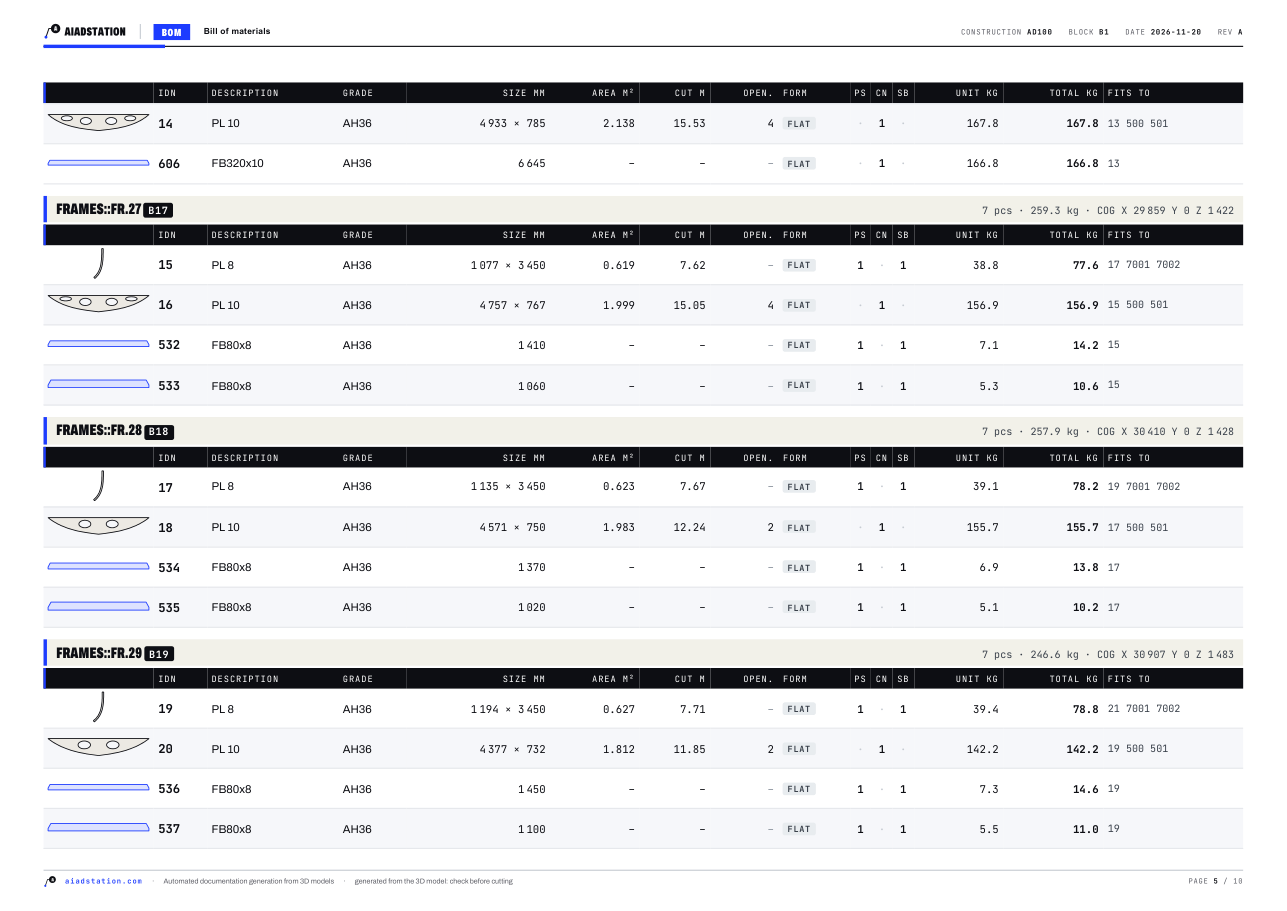
Every part by assembly location: outline, size, area, cut length, openings, quantity per side, fits-to.
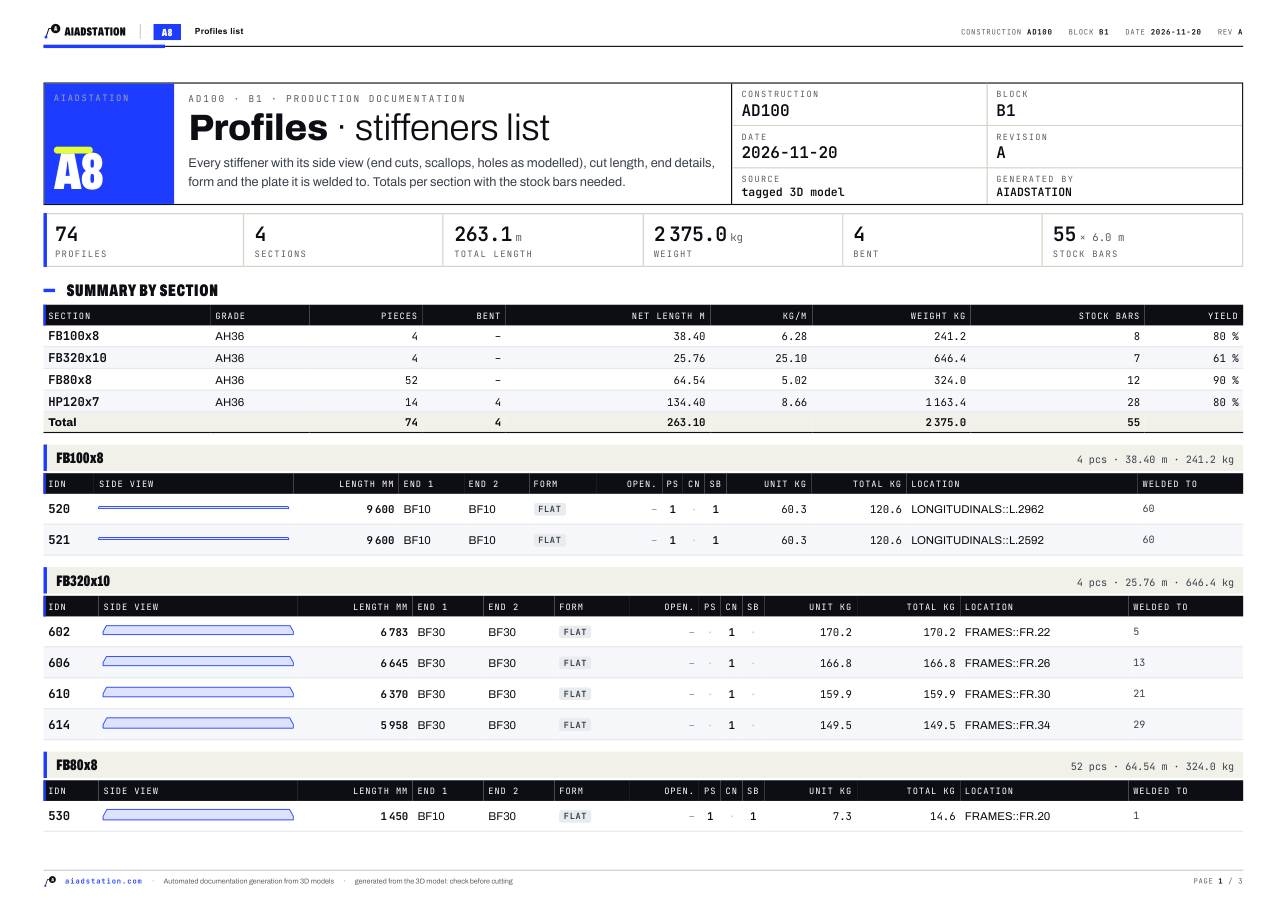
Every stiffener in side view with end cuts and cut length, totals per section and stock bars.
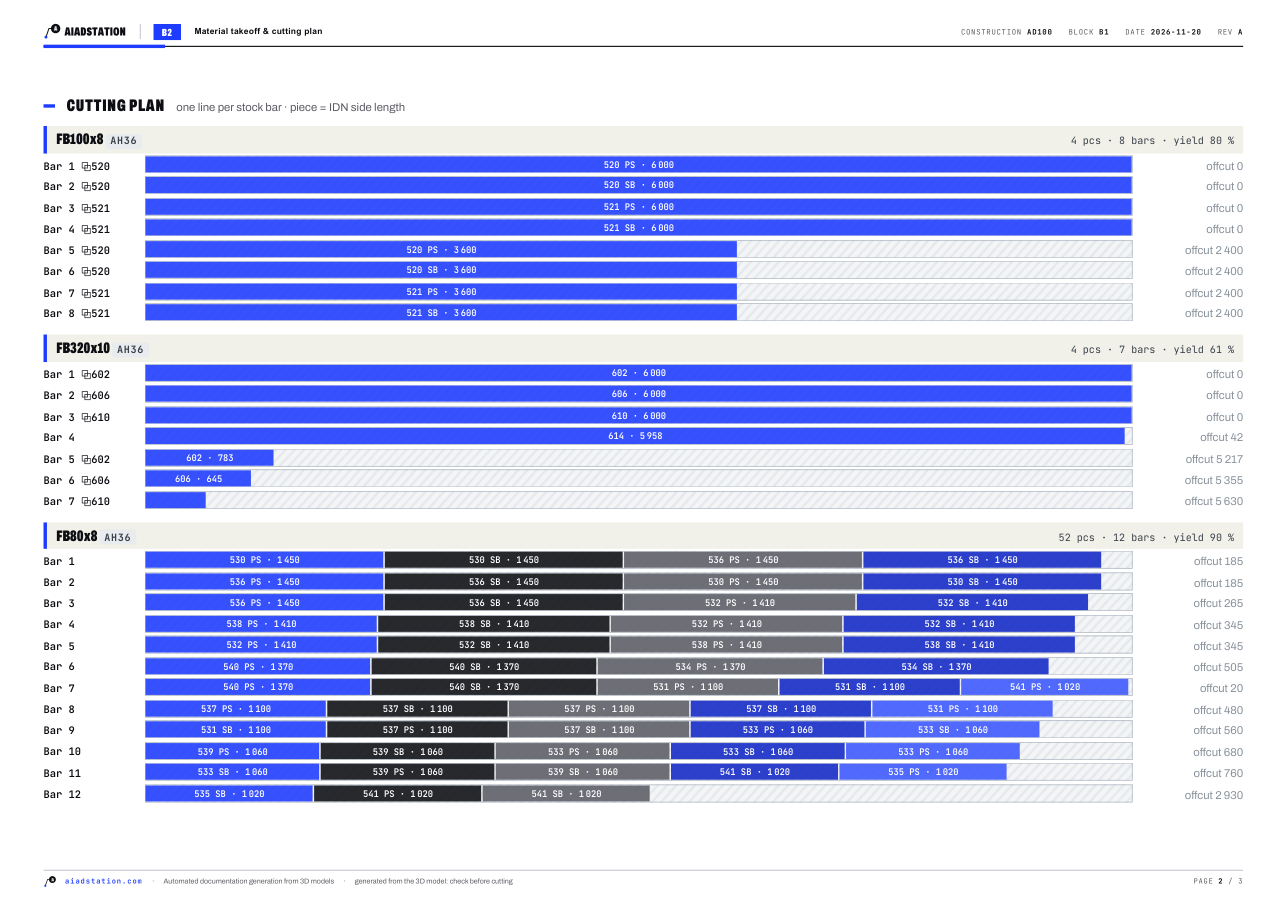
Plates by thickness and grade, profiles by section, a bar-by-bar cutting plan with yield.
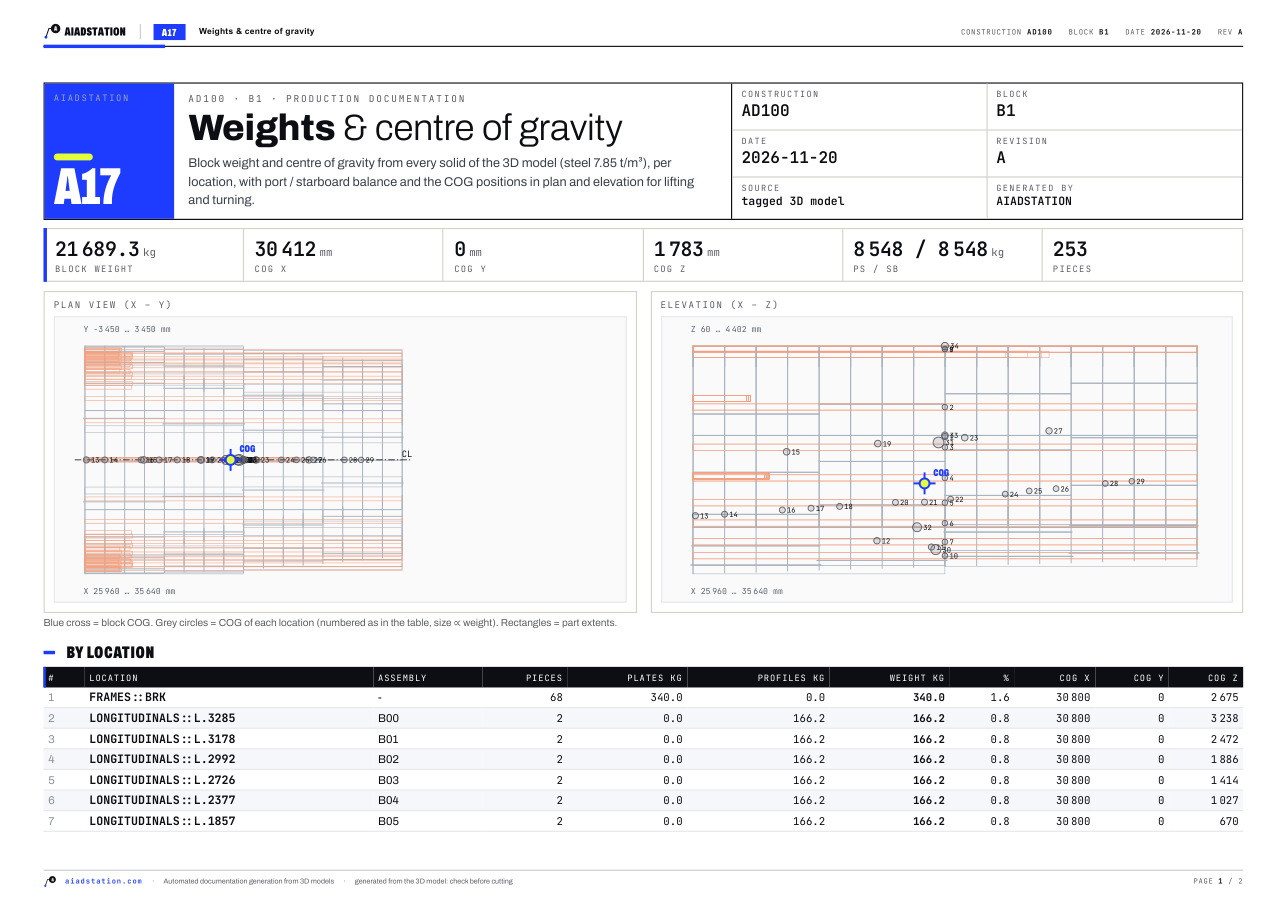
Block and location weights, centres of gravity in plan and elevation, port / starboard balance.
Forming data for every curved plate: expansion, templates, sight line, ordinates, strain checks.
Parts nested on stock sheets per thickness and grade, marking and part labels included.
Bending sketches for curved stiffeners and shell profiles, with ordinates at every station.
Your model back with usertexts, names and the full layer tree, plus a per-part report of every decision.
We test against blocks that were already tagged by their designers: strip every tag, run the block naked, compare part by part.
of 1,636 profile sections named exactly, from real cross-sections.
of 2,033 plate thicknesses matched exactly.
to read and tag a 1,581-solid block, on two processor cores.
of geometry changed. Only attributes, names and layers are written.
Tests on four delivered superyacht hull blocks. Parts where the rules are less certain carry an autotag_confidence usertext and a line in the report, so a person checks only those.
Ship designs are confidential. The service is built so that your geometry is never modified, never shared, and only on a machine while your job runs.
The upload is kept as it is. The result is a copy in which only usertexts, object names and layers change.
Jobs and files live on AWS in Stockholm (eu-north-1).
The calculator is a dedicated machine that switches on for your job and off again when nothing is running.
Delete a job and every file that belongs to it, input and results, with one click.
Every tag comes from measured geometry and the frame table you confirm. Deterministic and repeatable.
Uncertain parts get an autotag_confidence usertext and a report line. Nothing is silently invented.
Run your own block on the free trial and judge the documents yourself. Move to Premium when the pack goes to the yard.
Running several hulls or a whole yard? Tell us in the form and we will set it up with you.
Sign in with your company email: we send a 6-digit code, no password. The first code creates your free account. Personal and temporary mailboxes are not accepted.
A Rhino .3dm with the steel parts of the block as closed polysurfaces. No layers, names or usertexts are needed. Files up to 800 MB.
They are left out, moved to the AUTOTAG::SKIPPED layer and listed in the report, so you know exactly what was not tagged.
No. Your upload is kept untouched and the result is a copy in which only usertexts, object names and layers change.
From the planes the plates lie in and a structure table you confirm: frames, longitudinals, decks, half frames and the structure codes of your project. Stiffeners follow the plate they are welded to.
In tests on four delivered blocks: profile sections named exactly on 1,636 of 1,636 profiles, plate thickness on 2,031 of 2,033 plates. Uncertain parts are flagged with an autotag_confidence usertext and a report line.
BOM, A8 profiles, B2 takeoff with cutting plan, A17 weights and COG, A11 bending sheets for curved plates, NE nesting per thickness and A7 / A9 profile sketches. PDF on the trial; clean PDF, DWG and Excel on Premium.
Minutes. The calculator switches on when you upload, reads and tags the block, waits for your structure-table check, then runs the four document streams in parallel. The job page shows every step with its clock.
On AWS in Stockholm (eu-north-1). You can delete a job and all its files at any time.